A Future Ransomware Attack exploiting the CrowdStrike Incident Vulnerabilities

Timeline of Events

Day 1: Discovery and Initial Breach

08:00 AM
A group of sophisticated cybercriminals identifies a vulnerability in the CrowdStrike Falcon software, based on the incident from July 2024. They exploit an unpatched version running on the IT systems of a major metropolitan hospital and an international airline.

09:30 AM
The attackers breach the hospital’s network through a compromised endpoint, gaining access to the internal systems. Simultaneously, they infiltrate the airline’s network, targeting critical operational systems.

11:00 AM
Malware is quietly installed on both networks. The ransomware is set to initiate a coordinated attack designed to maximize disruption. The attackers spend the next few hours exploring the networks, identifying key systems, and ensuring they have control over backups and critical infrastructure.

Day 2: Attack Initiation

07:00 AM
The ransomware is activated across the hospital’s network, encrypting patient records, diagnostic equipment, and critical medical databases. Simultaneously, the airline’s systems are attacked, with operational software and booking systems being encrypted.

07:15 AM
Hospital staff discover that their systems are inaccessible. Alarms and diagnostic tools start malfunctioning, creating confusion and panic among medical personnel.

07:30 AM
At the airline’s main hub, boarding systems, check-in kiosks, and flight scheduling systems fail. Flights are delayed, and passengers are left stranded, unaware of the unfolding cyberattack.

Day 3: Escalation and National Impact

08:00 AM
News of the hospital’s IT outage spreads quickly. Emergency procedures are activated, and patients in critical care are transferred to other hospitals, causing strain on neighboring medical facilities.

09:00 AM
The airline cancels all flights from major airports due to the ransomware attack. Passengers are stuck in terminals, causing massive delays and overcrowding. The airline’s customer service lines are overwhelmed with calls.

10:00 AM
The attackers demand a ransom of $50 million in cryptocurrency to decrypt the hospital and airline systems. They threaten to release sensitive patient data and airline customer information if the ransom is not paid within 48 hours.

Day 4: Government and Public Response

08:00 AM
The government issues a national emergency declaration. Cybersecurity experts from federal agencies are dispatched to assist in resolving the situation.

09:30 AM
News outlets report on the ransomware attack, causing widespread public panic. The stock market reacts negatively, with shares in healthcare and airline industries plummeting.

11:00 AM
Hospitals nationwide are put on high alert. The Department of Health and Human Services coordinates with other hospitals to manage the overflow of patients.

01:00 PM
The airline’s CEO holds a press conference, apologizing for the disruptions and assuring the public that they are working to resolve the issue. The Federal Aviation Administration (FAA) is involved in managing the air traffic chaos.

Day 5: Crisis Management and Mitigation

08:00 AM
Federal cybersecurity teams begin working with the hospital and airline to contain the ransomware spread and assess the damage. Efforts are made to restore critical systems using backup data.

10:00 AM
The attackers release a sample of stolen data to demonstrate their seriousness. The hospital’s and airline’s reputations take a severe hit as the public fears for their personal information.

12:00 PM
Negotiations with the attackers are initiated, but progress is slow. Alternative plans are developed to restore systems without paying the ransom.

04:00 PM
A temporary workaround is implemented for the hospital to access basic patient care systems. The airline begins manually processing flight schedules to resume limited operations.

Day 6: Resolution Efforts and Aftermath

08:00 AM
Federal agencies successfully decrypt parts of the ransomware. The hospital’s critical systems are gradually restored, although many patient records remain encrypted.

09:00 AM
The airline resumes more flights, but a full recovery is still weeks away. Thousands of passengers are still affected, and compensations are being arranged.

12:00 PM
Public health advisories are issued to mitigate the spread of misinformation and panic. Government officials hold briefings to reassure the public and outline steps being taken.

Day 7: Recovery and Reflection

08:00 AM
Both the hospital and airline begin a thorough review of their cybersecurity measures. Plans for stronger defenses and better incident response strategies are developed.

10:00 AM
The government announces a new cybersecurity initiative aimed at critical infrastructure protection, emphasizing the need for advanced threat detection and response systems.

02:00 PM
The attack becomes a case study for cybersecurity experts worldwide, highlighting the importance of robust security protocols and the dangers of an expanded attack surface.

This fictional scenario, while hypothetical, demonstrates how vulnerabilities exposed in a significant incident like the CrowdStrike breach can lead to catastrophic consequences. The ripple effect of such an attack can disrupt essential services, create national chaos, and prompt a reevaluation of cybersecurity strategies across industries. It underscores the critical need for constant vigilance, advanced security measures, and comprehensive response plans to protect against the ever-evolving landscape of cyber threats.

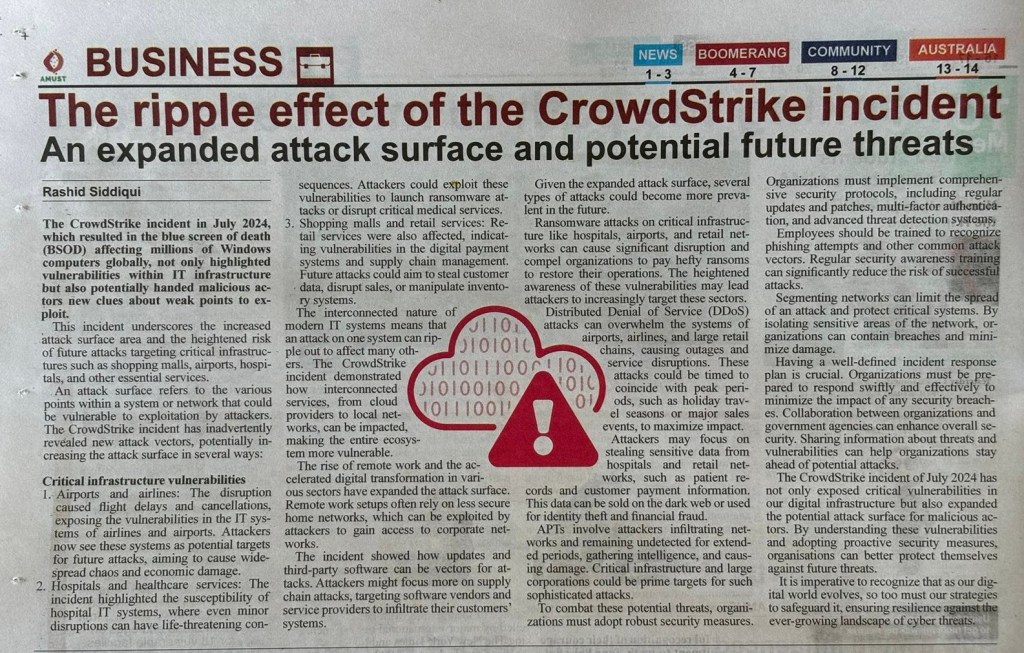
The Ripple Effect of the CrowdStrike Incident – An Expanded Attack Surface and Potential Future Threats

The CrowdStrike incident in July 2024, which resulted in the blue screen of death (BSOD) affecting millions of Windows computers globally, not only highlighted vulnerabilities within IT infrastructure but also potentially handed malicious actors new clues about weak points to exploit. This incident underscores the increased attack surface area and the heightened risk of future attacks targeting critical infrastructures such as shopping malls, airports, hospitals, and other essential services.

If you missed my previous blog explaining the CrowdStrike Incident, you can refer it here: Understanding the CrowdStrike Incident of July 2024

The Expanded Attack Surface

An attack surface refers to the various points within a system or network that could be vulnerable to exploitation by attackers. The CrowdStrike incident has inadvertently revealed new attack vectors, potentially increasing the attack surface in several ways:

Critical Infrastructure Vulnerabilities

  1. Airports and Airlines: The disruption caused flight delays and cancellations, exposing the vulnerabilities in the IT systems of airlines and airports. Attackers now see these systems as potential targets for future attacks, aiming to cause widespread chaos and economic damage.
  2. Hospitals and Healthcare Services: The incident highlighted the susceptibility of hospital IT systems, where even minor disruptions can have life-threatening consequences. Attackers could exploit these vulnerabilities to launch ransomware attacks or disrupt critical medical services.
  3. Shopping Malls and Retail Services: Retail services were also affected, indicating vulnerabilities in the digital payment systems and supply chain management. Future attacks could aim to steal customer data, disrupt sales, or manipulate inventory systems.

Increased Interconnectivity

The interconnected nature of modern IT systems means that an attack on one system can ripple out to affect many others. The CrowdStrike incident demonstrated how interconnected services, from cloud providers to local networks, can be impacted, making the entire ecosystem more vulnerable.

Remote Work and Digital Transformation

The rise of remote work and the accelerated digital transformation in various sectors have expanded the attack surface. Remote work setups often rely on less secure home networks, which can be exploited by attackers to gain access to corporate networks.

Supply Chain Attacks

The incident showed how updates and third-party software can be vectors for attacks. Attackers might focus more on supply chain attacks, targeting software vendors and service providers to infiltrate their customers’ systems.

Potential Future Attacks

Given the expanded attack surface, several types of attacks could become more prevalent in the future:

Ransomware Attacks

Ransomware attacks on critical infrastructure like hospitals, airports, and retail networks can cause significant disruption and compel organizations to pay hefty ransoms to restore their operations. The heightened awareness of these vulnerabilities may lead attackers to increasingly target these sectors.

DDoS Attacks

Distributed Denial of Service (DDoS) attacks can overwhelm the systems of airports, airlines, and large retail chains, causing outages and service disruptions. These attacks could be timed to coincide with peak periods, such as holiday travel seasons or major sales events, to maximize impact.

Data Breaches and Theft

Attackers may focus on stealing sensitive data from hospitals and retail networks, such as patient records and customer payment information. This data can be sold on the dark web or used for identity theft and financial fraud.

Advanced Persistent Threats (APTs)

APTs involve attackers infiltrating networks and remaining undetected for extended periods, gathering intelligence, and causing damage. Critical infrastructure and large corporations could be prime targets for such sophisticated attacks.

Mitigating the Risks

To combat these potential threats, organizations must adopt robust security measures:

Enhanced Security Protocols

Organizations must implement comprehensive security protocols, including regular updates and patches, multi-factor authentication, and advanced threat detection systems.

Employee Training and Awareness

Employees should be trained to recognize phishing attempts and other common attack vectors. Regular security awareness training can significantly reduce the risk of successful attacks.

Network Segmentation

Segmenting networks can limit the spread of an attack and protect critical systems. By isolating sensitive areas of the network, organizations can contain breaches and minimize damage.

Incident Response Planning

Having a well-defined incident response plan is crucial. Organizations must be prepared to respond swiftly and effectively to minimize the impact of any security breaches.

Collaboration and Information Sharing

Collaboration between organizations and government agencies can enhance overall security. Sharing information about threats and vulnerabilities can help organizations stay ahead of potential attacks.

Conclusion

The CrowdStrike incident of July 2024 has not only exposed critical vulnerabilities in our digital infrastructure but also expanded the potential attack surface for malicious actors. By understanding these vulnerabilities and adopting proactive security measures, organizations can better protect themselves against future threats. It is imperative to recognize that as our digital world evolves, so too must our strategies to safeguard it, ensuring resilience against the ever-growing landscape of cyber threats.

Important References

  1. “Security Engineering: A Guide to Building Dependable Distributed Systems” by Ross Anderson
  2. “Building Secure and Reliable Systems: Best Practices for Designing, Implementing, and Maintaining Systems” by Heather Adkins, et al.
  3. “Zero Trust Networks: Building Secure Systems in Untrusted Networks” by Evan Gilman and Doug Barth
  4. Research Paper: “Network Segmentation: Architecture and Use Cases” by the SANS Institute

OTP tools and the risk of DLL Sideloading

Recently i was doing some research around OTP softwares much like Google Authenticator or MS Authenticator and came across the topic of DLL Sideloading. Though this topic is quite old, i thought it is good to share me learning outcome.

Okay, in simple terms, imagine you have a secret code that can open a magical door in a castle. But instead of keeping this code safe, you leave it lying around where someone naughty can find it. Now, that naughty person uses your code to open the magical door and sneak into the castle, causing mischief.

In computer terms, a DLL (Dynamic Link Library) is like a special code that helps programs run smoothly. Now, a DLL Sideloading attack is when a sneaky person tricks a computer into using a bad DLL instead of the good one. Just like using the wrong key for the magical door, this bad DLL can let naughty things happen on the computer, like letting viruses or bad software sneak in. So, it’s important to keep our computer’s keys (DLLs) safe and not let any sneaky tricks happen!

DLL sideloading is an attack technique where a malicious DLL (Dynamic Link Library) file is placed in a directory that is trusted or commonly accessed by a legitimate application. When the application runs, it inadvertently loads and executes the malicious DLL instead of the legitimate one.

Reasons Why It Is Difficult to Deal With:

  1. Automatic Loading: The runtime DLL required for the one-time password (OTP) tool is automatically loaded by Windows, which means the system expects and trusts certain DLLs to be present and executable without user intervention.
  2. Fixed DLL Specification: The OTP tool does not allow the user to specify which DLLs to load, relying instead on default system behavior to find and load the necessary libraries.
  3. Security Environment: Ensuring that the device running the OTP tool is in an up-to-date security environment can reduce the risk. This includes maintaining the latest security patches, antivirus definitions, and security configurations.

Mitigations:

  • Keep Software and OS Updated: Regularly update the operating system and all software to patch known vulnerabilities.
  • Antivirus/Antimalware Tools: Use reliable antivirus and antimalware tools to detect and remove malicious DLLs.
  • Application Whitelisting: Implement application whitelisting to prevent unauthorized DLLs from being loaded.
  • Directory Permissions: Restrict write permissions to directories where legitimate DLLs are stored to prevent unauthorized modifications.
  • Monitoring and Logging: Continuously monitor and log application behavior to detect and respond to abnormal DLL loading activities.

The difference between path-based and signature-based DLL loading methods lies in how the operating system or application identifies and loads the required Dynamic Link Libraries (DLLs).

Path-Based DLL Loading

Description:

  • Method: The operating system or application loads a DLL based on its file path. This means the system will search for the DLL in specific directories in a predetermined order until it finds a matching file name.
  • Search Order: Typically, the search order might include the application’s directory, system directories (like System32), the Windows directory, and directories listed in the system’s PATH environment variable.
  • Risks: Path-based loading is susceptible to DLL hijacking or sideloading attacks. If a malicious DLL with the same name as a legitimate DLL is placed in a directory that is searched earlier in the order, the malicious DLL will be loaded instead of the legitimate one.

Example: If an application needs a DLL called example.dll, it might look in:

  1. The application’s own directory.
  2. The system directory (e.g., C:\Windows\System32).
  3. The Windows directory (e.g., C:\Windows).
  4. Any directories listed in the PATH environment variable.

Signature-Based DLL Loading

Description:

  • Method: The operating system or application loads a DLL based on a digital signature that verifies the identity and integrity of the DLL. This involves using cryptographic methods to ensure that the DLL has not been tampered with and is from a trusted source.
  • Verification Process: The system checks the digital signature against a trusted certificate authority (CA). If the signature is valid and the DLL is from a trusted source, the DLL is loaded.
  • Advantages: This method enhances security by ensuring that only DLLs from trusted sources are loaded, mitigating risks from malicious or tampered DLLs.

Example: An application might require a DLL to have a specific digital signature from a trusted CA. Before loading example.dll, the system checks its signature against the trusted CA. If the signature is valid and trusted, the DLL is loaded; otherwise, it is rejected.

Comparison

Path-Based DLL Loading:

  • Pros:
    • Simpler and faster, as it relies on the file path and name.
    • No need for complex verification processes.
  • Cons:
    • Vulnerable to attacks such as DLL hijacking or sideloading.
    • Relies heavily on the correct configuration of directory paths.

Signature-Based DLL Loading:

  • Pros:
    • More secure as it ensures the integrity and authenticity of the DLL.
    • Reduces the risk of loading malicious or tampered DLLs.
  • Cons:
    • Requires a valid digital signature and access to a trusted CA.
    • Slightly more complex and resource-intensive due to the need for cryptographic verification.

Mitigation Strategies

To mitigate the risks associated with path-based DLL loading:

  • Use Absolute Paths: Specify absolute paths to DLLs whenever possible to avoid ambiguity.
  • Directory Permissions: Secure directories by restricting write permissions to prevent unauthorized placement of malicious DLLs.
  • Application Whitelisting: Implement whitelisting to allow only known and trusted DLLs to be loaded.

For signature-based DLL loading:

  • Regular Updates: Ensure that certificates and signatures are kept up-to-date.
  • Trusted Sources: Only use DLLs from trusted and verified sources.
  • Monitor and Audit: Regularly monitor and audit DLL usage and loading processes to detect any anomalies.

By understanding and implementing these methods appropriately, organizations can significantly enhance their application’s security against DLL-related threats.

If laptops are secured and properly controlled for antivirus and patches, the likelihood of exploitation through DLL sideloading vulnerabilities is significantly reduced. However, it is essential to understand that while these measures provide a robust defense, they do not entirely eliminate the risk. Here’s why:

Factors Reducing the Risk

  1. Antivirus and Antimalware Protection:
    • Real-Time Protection: Modern antivirus and antimalware solutions offer real-time protection that can detect and block known malicious DLLs before they can be executed.
    • Heuristic Analysis: These tools use heuristic and behavioral analysis to detect suspicious activities that might indicate a DLL sideloading attempt, even if the specific malware is not in their signature database.
  2. Regular Patching and Updates:
    • Operating System Updates: Regularly updating the operating system ensures that known vulnerabilities, including those that might facilitate DLL sideloading, are patched.
    • Application Updates: Keeping applications up-to-date helps close security loopholes that could be exploited by malicious DLLs.
  3. Controlled Environment:
    • Restricted Administrative Access: Limiting administrative privileges can prevent unauthorized installation of malicious software that might place a malicious DLL in the system.
    • Application Whitelisting: Implementing application whitelisting can ensure that only approved and trusted applications and their DLLs are executed.

Remaining Risk Factors

  1. Zero-Day Exploits:
    • Unknown Vulnerabilities: Even with up-to-date systems and antivirus software, zero-day vulnerabilities (previously unknown security flaws) can be exploited by sophisticated attackers to bypass these defenses.
  2. User Behavior:
    • Phishing and Social Engineering: Users might inadvertently download and execute malicious files if they are tricked by phishing attacks or other forms of social engineering.
  3. Sophisticated Malware:
    • Advanced Persistent Threats (APTs): Some malware is specifically designed to evade detection by antivirus software and can employ advanced techniques to achieve DLL sideloading.

Overall Likelihood

Given the strong security measures in place (antivirus, patches, controlled environment), the likelihood of exploitation through DLL sideloading is low but not zero. The effectiveness of these measures largely depends on their consistent and proper implementation.

Mitigations to Further Reduce Risk

  • Enhanced Monitoring: Implementing advanced endpoint detection and response (EDR) tools can provide deeper insights into system activities and potential threats.
  • User Education: Regular training for users on recognizing phishing attempts and other social engineering tactics can reduce the likelihood of accidental malware execution.
  • Regular Security Audits: Conducting periodic security audits can help identify and mitigate potential vulnerabilities that might have been overlooked.

By maintaining a vigilant and layered security approach, the risk of DLL sideloading exploitation can be minimized to a very low level.