BGP Flowspec Configuration for Juniper MX

Reference to the last article for more reference is here. In this example we assume that the Arbor SP Collector Appliance is 10.100.200.10 and the specific Juniper device is 10.1.2.3 with a configured community 1234:5678 for RTBH purposes.

Step1: Create a FlowSpec policy allowing Arbor SP Collector IP Address

set policy-options policy-statement ARBOR_FS_POLICY from neighbor 10.100.200.10
set policy-options policy-statement ARBOR_FS_POLICY then accept

Step2: Create a FlowSpec policy allowing specific community advertisement for RTBH

set policy-options community ARBOR_ALLOWED_COMMUNITY members target:1234:5678
set policy-options policy-statement ARBOR_IMPORT_POLICY term BGP from community ARBOR_ALLOWED_COMMUNITY

Step3: Configure the routes you want to send to Arbor SP for analytics purposes.

set policy-options policy-statement ROUTES-TO-ARBOR term DIRECT from protocol direct
set policy-options policy-statement ROUTES-TO-ARBOR term DIRECT then accept
set policy-options policy-statement ROUTES-TO-ARBOR term OSPF from protocol ospf
set policy-options policy-statement ROUTES-TO-ARBOR term OSPF then accept
set policy-options policy-statement ROUTES-TO-ARBOR term BGP from protocol bgp
set policy-options policy-statement ROUTES-TO-ARBOR term BGP then accept

Step4: Configure the bgp neighbor group

set routing-instances Internet protocols bgp group ARBOR-BGP type internal
set routing-instances Internet protocols bgp group ARBOR-BGP local-address 10.1.2.3
set routing-instances Internet protocols bgp group ARBOR-BGP import ARBOR_IMPORT_POLICY
set routing-instances Internet protocols bgp group ARBOR-BGP family inet unicast
set routing-instances Internet protocols bgp group ARBOR-BGP family inet flow no-validate ARBOR_FS_POLICY
set routing-instances Internet protocols bgp group ARBOR-BGP export ROUTES-TO-ARBOR

Step5: Configure BGP Neighbor.

set routing-instances Internet protocols bgp group ARBOR-BGP neighbor 10.100.200.10 description Arbor_BGP
set routing-instances Internet protocols bgp group ARBOR-BGP neighbor 10.100.200.10 family inet unicast
set routing-instances Internet protocols bgp group ARBOR-BGP neighbor 10.100.200.10 family inet flow

Verification:

show route table Internet.inetflow.0 detail

show firewall filter __flowspec_Internet_inet__ detail logical-system all
show route receive-protocol bgp 10.100.200.10 table Internet


BGP Flowspec Configuration for ASRs

Recently i worked on BGP Flowspec based attack mitigation using Arbor SP. This post will delineate the key findings and configuration experience to help others in doing a similar deployment.

Arbor SP [1] is the Visibility and Attack Detection Engine, which runs on a hypervisor layer such as Cisco UCS. The job of Arbor SP is to collect NetFlow, SNMP and BGP data from the various core/ edge routers in the network and analyse the statistics. Traffic patterns are observed and compared against historical data and known attack signatures within Arbor SP’s profiling database, it is worth mentioning at this point that subscription to Arbor’s analytics service is required in order to maintain an up to date database of threat signatures, similar to any AV/AMP service.

When Arbor SP detects an unusual pattern of traffic it will raise alerts to the specified operators or can be configured to automatically intervene to mitigate the threat utilising BGP FlowSpec, in which case it will send ACL updates to the specific routers, and /or redirect illegitimate traffic to the Arbor TMS blade on the ASR9k in order to be scrubbed.

Flowspec mitigation is for the targeted attack. This type of attack is not bandwidth sensitive in general, but specific to some port, protocol or IP Address. The attacks in the scope of flowspec mitigation are:

  1. Protocol Attacks
  2. Application Attacks

Protocol attacks are the attacks that render a target in-accessible by exploiting a weakness in the Layer 3 and Layer 4 protocol stack. Example SYN Flood, Ping of Death.

Application attacks are the attacks hat exploit a weakness in the Layer 7 protocol stack. The most sophisticated of attacks and most challenging to identify/mitigate. Example, HTTP Flood, Attack on DNS Services.

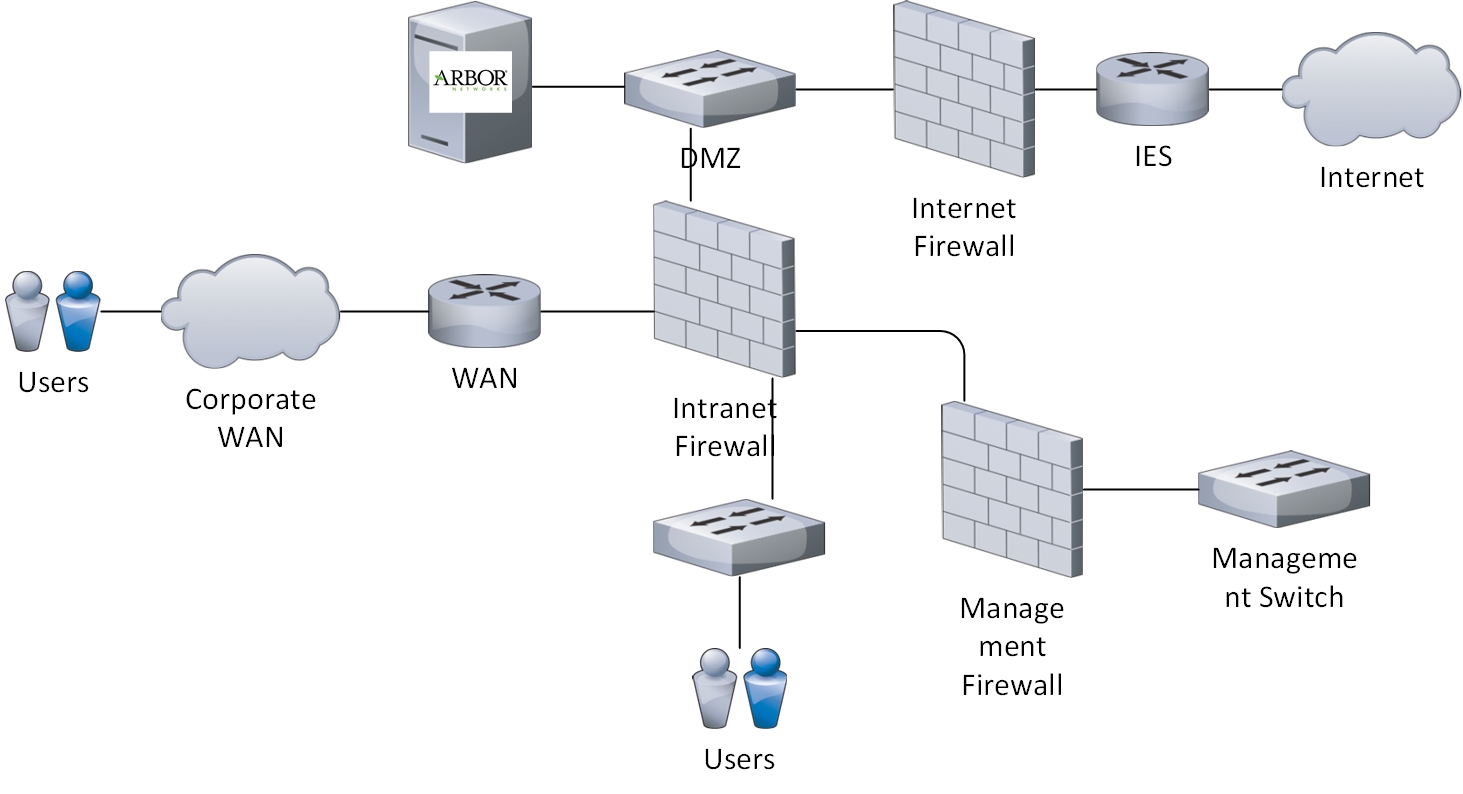
Generally in any enterprise network, Arbor SP is placed in a security zone where it has SNMP, Flow (netflow/jflow) and BGP connectivity in place. This could be either in DMZ, Intranet or in a secure Management zone. It entirely depends on the specific architectural decision specific to an environment.

For BPConsidering we have the SP deployed and connectivity in place, if we want to add an ASR as a flowspec client we need to do followings.

Step1: Enable the flowspec feature on ASR.

flowspec
local-install interface-all
address-family ipv4
local-install interface-all
!
vrf Internet
address-family ipv4
local-install interface-all

Step2: Enable the flowspec address-family in BGP.

router bgp 12345

address-family ipv4 flowspec
!
address-family vpnv4 flowspec

Step3: Enable the same flowspec address-family in specific VRF where we are going to have BGP Neighborship with SP.

vrf Internet

 address-family ipv4 flowspec

Step4: Enable the same flowspec address-family in specific BGP VRF where we are going to have BGP Neighborship with SP.

router bgp 12345
vrf Internet

 address-family ipv4 flowspec

This will make the vrf Internet to have the capability to add an Arbor SP Collector as a BGP Neighbor.

Step5: Create the neighbor group for Arbor Collector.

neighbor-group ARBOR-BGP
remote-as 12345
update-source Bundle-EtherXY.123
address-family ipv4 unicast
route-policy IMPORT-FROM-ARBOR in
route-reflector-client
route-policy ALLOW-ALL out
soft-reconfiguration inbound always
!
address-family ipv4 flowspec
!

It is good if we can have the BGP Neighbors prefixes exchange controlled using route-policies as in above configuration. Please note that the route-policy in is used when we configure RTBH or any decision which we want to take based on a community value. Flowspec rule will never make use of in route-policy.

router bgp 12345
vrf Internet

neighbor 1.2.3.4

 use neighbor-group ARBOR-BGP

Now, if we have proper SP configuration at Arbor side, we should see the BGP getting up using following command.

show bgp vrf Internet summary

To check if the BGP neighborship for flowspec capability is up or not, we can issue following command.

show bgp vrf Internet ipv4 flowspec summary

Once we have the flowspec neighborship established, we can then make use of flowspec capabilities. At this stage we can create a flowspec advertisement on Arbor SP and issue following command on ASR to check if the ASR is receiving the flowspec advertisement or not.

show flowspec vrf all afi-all internal

This command will list the rule FlowSpec rule, its source and destination IP Addresses and the Match and action criteria it performs.

In the next post i will explain the command sets for Juniper.

References:

[1] https://gblogs.cisco.com/uki/mitigating-ddos-with-arbor-on-the-cisco-asr9k/