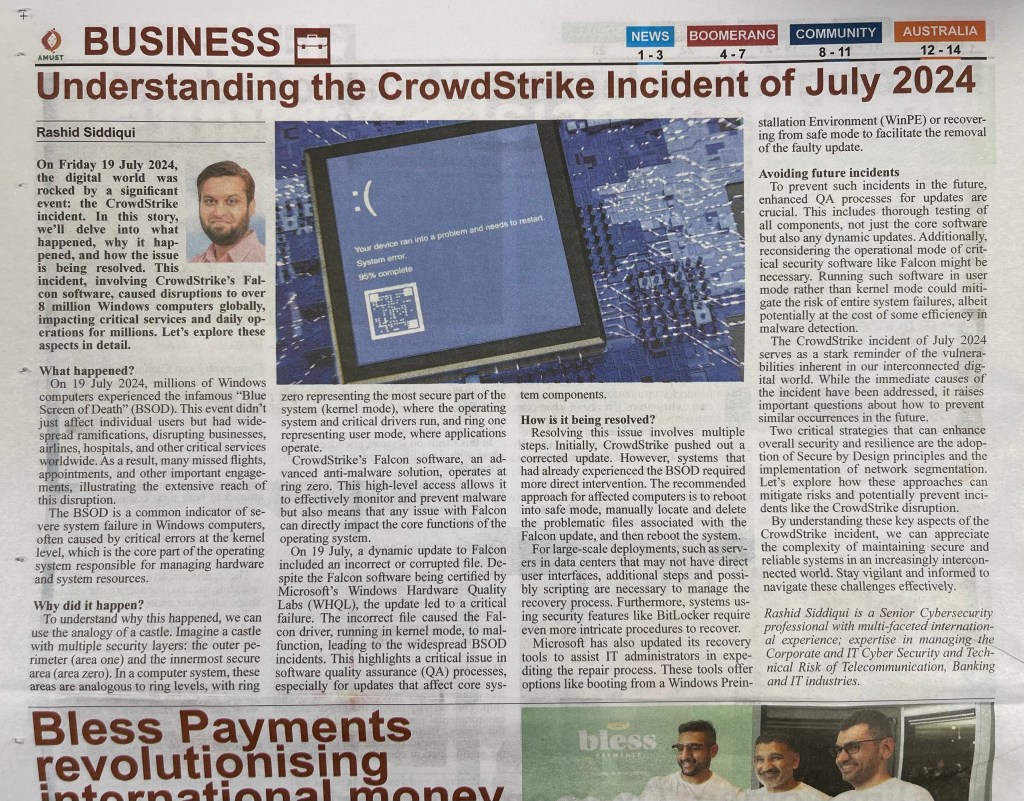
Understanding the CrowdStrike Incident of July 2024

In July 2024, the digital world was rocked by a significant event: the CrowdStrike incident. In this blog post, we’ll delve into what happened, why it happened, and how the issue is being resolved. This incident, involving CrowdStrike’s Falcon software, caused disruptions to over 8 million Windows computers globally, impacting critical services and daily operations for millions. Let’s explore these aspects in detail.

What Happened?

On July 19, 2024, millions of Windows computers experienced the infamous “Blue Screen of Death” (BSOD). This event didn’t just affect individual users but had widespread ramifications, disrupting businesses, airlines, hospitals, and other critical services worldwide. As a result, many missed flights, appointments, and other important engagements, illustrating the extensive reach of this disruption.

The BSOD is a common indicator of severe system failure in Windows computers, often caused by critical errors at the kernel level, which is the core part of the operating system responsible for managing hardware and system resources.

Why Did It Happen?

To understand why this happened, we can use the analogy of a castle. Imagine a castle with multiple security layers: the outer perimeter (area one) and the innermost secure area (area zero). In a computer system, these areas are analogous to ring levels, with ring zero representing the most secure part of the system (kernel mode), where the operating system and critical drivers run, and ring one representing user mode, where applications operate.

CrowdStrike’s Falcon software, an advanced anti-malware solution, operates at ring zero. This high-level access allows it to effectively monitor and prevent malware but also means that any issue with Falcon can directly impact the core functions of the operating system.

On July 19th, a dynamic update to Falcon included an incorrect or corrupted file. Despite the Falcon software being certified by Microsoft’s Windows Hardware Quality Labs (WHQL), the update led to a critical failure. The incorrect file caused the Falcon driver, running in kernel mode, to malfunction, leading to the widespread BSOD incidents. This highlights a critical issue in software quality assurance (QA) processes, especially for updates that affect core system components.

How Is It Being Resolved?

Resolving this issue involves multiple steps. Initially, CrowdStrike pushed out a corrected update. However, systems that had already experienced the BSOD required more direct intervention. The recommended approach for affected computers is to reboot into safe mode, manually locate and delete the problematic files associated with the Falcon update, and then reboot the system.

For large-scale deployments, such as servers in data centers that may not have direct user interfaces, additional steps and possibly scripting are necessary to manage the recovery process. Furthermore, systems using security features like BitLocker require even more intricate procedures to recover.

Microsoft has also updated its recovery tools to assist IT administrators in expediting the repair process. These tools offer options like booting from a Windows Preinstallation Environment (WinPE) or recovering from safe mode to facilitate the removal of the faulty update.

Avoiding Future Incidents

To prevent such incidents in the future, enhanced QA processes for updates are crucial. This includes thorough testing of all components, not just the core software but also any dynamic updates. Additionally, reconsidering the operational mode of critical security software like Falcon might be necessary. Running such software in user mode rather than kernel mode could mitigate the risk of entire system failures, albeit potentially at the cost of some efficiency in malware detection.

The CrowdStrike incident of July 2024 serves as a stark reminder of the vulnerabilities inherent in our interconnected digital world. While the immediate causes of the incident have been addressed, it raises important questions about how to prevent similar occurrences in the future. Two critical strategies that can enhance overall security and resilience are the adoption of Secure by Design principles and the implementation of network segmentation. Let’s explore how these approaches can mitigate risks and potentially prevent incidents like the CrowdStrike disruption.

Secure by Design Principles

Secure by Design (SbD) is an approach that integrates security from the very beginning of the software development lifecycle. This principle ensures that security considerations are embedded into every stage of development, from initial design to deployment and maintenance. Here’s how SbD could have impacted the CrowdStrike incident:

Early Threat Modeling

Incorporating threat modeling at the design phase helps identify potential vulnerabilities and attack vectors. If CrowdStrike had implemented a thorough threat modeling process, it might have identified the risks associated with running their software in kernel mode (ring zero), where any failure could lead to a system-wide crash.

Code Review and Static Analysis

Regular code reviews and static analysis can catch bugs and vulnerabilities early in the development process. Comprehensive testing, including stress testing and failure mode analysis, could have identified the problematic update before it was released, preventing the blue screen of death (BSOD) incidents.

Continuous Integration and Continuous Deployment (CI/CD) with Security Checks

Integrating automated security checks into the CI/CD pipeline ensures that every code change is tested for security issues before deployment. This approach can significantly reduce the risk of deploying updates with critical vulnerabilities.

Network Segmentation

Network segmentation involves dividing a network into smaller, isolated segments to limit the spread of potential threats and contain breaches. This strategy can significantly enhance the security posture of an organization by minimizing the impact of security incidents. Here’s how network segmentation could have mitigated the effects of the CrowdStrike incident:

Isolation of Critical Systems

By isolating critical systems and services into separate network segments, organizations can prevent the spread of issues from less critical areas. For instance, if critical systems in hospitals or airlines had been segmented away from general-purpose user systems, the BSOD incidents might have been contained, reducing the overall impact.

Minimizing Attack Surfaces

Segmentation reduces the attack surface by limiting access to sensitive systems. If the CrowdStrike Falcon software had been deployed in a segmented manner, with its updates and communications restricted to a controlled environment, the faulty update might have been identified and contained before reaching all systems.

Improved Monitoring and Incident Response

Segmentation allows for more granular monitoring and quicker incident response. Security teams can focus their efforts on specific segments, making it easier to detect anomalies and take corrective actions. This could have sped up the identification and resolution of the faulty Falcon update.

By understanding these key aspects of the CrowdStrike incident, we can appreciate the complexity of maintaining secure and reliable systems in an increasingly interconnected world. Stay vigilant and informed to navigate these challenges effectively.

Reference: https://www.youtube.com/watch?v=2TfM_BF2i-I

OTP tools and the risk of DLL Sideloading

Recently i was doing some research around OTP softwares much like Google Authenticator or MS Authenticator and came across the topic of DLL Sideloading. Though this topic is quite old, i thought it is good to share me learning outcome.

Okay, in simple terms, imagine you have a secret code that can open a magical door in a castle. But instead of keeping this code safe, you leave it lying around where someone naughty can find it. Now, that naughty person uses your code to open the magical door and sneak into the castle, causing mischief.

In computer terms, a DLL (Dynamic Link Library) is like a special code that helps programs run smoothly. Now, a DLL Sideloading attack is when a sneaky person tricks a computer into using a bad DLL instead of the good one. Just like using the wrong key for the magical door, this bad DLL can let naughty things happen on the computer, like letting viruses or bad software sneak in. So, it’s important to keep our computer’s keys (DLLs) safe and not let any sneaky tricks happen!

DLL sideloading is an attack technique where a malicious DLL (Dynamic Link Library) file is placed in a directory that is trusted or commonly accessed by a legitimate application. When the application runs, it inadvertently loads and executes the malicious DLL instead of the legitimate one.

Reasons Why It Is Difficult to Deal With:

  1. Automatic Loading: The runtime DLL required for the one-time password (OTP) tool is automatically loaded by Windows, which means the system expects and trusts certain DLLs to be present and executable without user intervention.
  2. Fixed DLL Specification: The OTP tool does not allow the user to specify which DLLs to load, relying instead on default system behavior to find and load the necessary libraries.
  3. Security Environment: Ensuring that the device running the OTP tool is in an up-to-date security environment can reduce the risk. This includes maintaining the latest security patches, antivirus definitions, and security configurations.

Mitigations:

  • Keep Software and OS Updated: Regularly update the operating system and all software to patch known vulnerabilities.
  • Antivirus/Antimalware Tools: Use reliable antivirus and antimalware tools to detect and remove malicious DLLs.
  • Application Whitelisting: Implement application whitelisting to prevent unauthorized DLLs from being loaded.
  • Directory Permissions: Restrict write permissions to directories where legitimate DLLs are stored to prevent unauthorized modifications.
  • Monitoring and Logging: Continuously monitor and log application behavior to detect and respond to abnormal DLL loading activities.

The difference between path-based and signature-based DLL loading methods lies in how the operating system or application identifies and loads the required Dynamic Link Libraries (DLLs).

Path-Based DLL Loading

Description:

  • Method: The operating system or application loads a DLL based on its file path. This means the system will search for the DLL in specific directories in a predetermined order until it finds a matching file name.
  • Search Order: Typically, the search order might include the application’s directory, system directories (like System32), the Windows directory, and directories listed in the system’s PATH environment variable.
  • Risks: Path-based loading is susceptible to DLL hijacking or sideloading attacks. If a malicious DLL with the same name as a legitimate DLL is placed in a directory that is searched earlier in the order, the malicious DLL will be loaded instead of the legitimate one.

Example: If an application needs a DLL called example.dll, it might look in:

  1. The application’s own directory.
  2. The system directory (e.g., C:\Windows\System32).
  3. The Windows directory (e.g., C:\Windows).
  4. Any directories listed in the PATH environment variable.

Signature-Based DLL Loading

Description:

  • Method: The operating system or application loads a DLL based on a digital signature that verifies the identity and integrity of the DLL. This involves using cryptographic methods to ensure that the DLL has not been tampered with and is from a trusted source.
  • Verification Process: The system checks the digital signature against a trusted certificate authority (CA). If the signature is valid and the DLL is from a trusted source, the DLL is loaded.
  • Advantages: This method enhances security by ensuring that only DLLs from trusted sources are loaded, mitigating risks from malicious or tampered DLLs.

Example: An application might require a DLL to have a specific digital signature from a trusted CA. Before loading example.dll, the system checks its signature against the trusted CA. If the signature is valid and trusted, the DLL is loaded; otherwise, it is rejected.

Comparison

Path-Based DLL Loading:

  • Pros:
    • Simpler and faster, as it relies on the file path and name.
    • No need for complex verification processes.
  • Cons:
    • Vulnerable to attacks such as DLL hijacking or sideloading.
    • Relies heavily on the correct configuration of directory paths.

Signature-Based DLL Loading:

  • Pros:
    • More secure as it ensures the integrity and authenticity of the DLL.
    • Reduces the risk of loading malicious or tampered DLLs.
  • Cons:
    • Requires a valid digital signature and access to a trusted CA.
    • Slightly more complex and resource-intensive due to the need for cryptographic verification.

Mitigation Strategies

To mitigate the risks associated with path-based DLL loading:

  • Use Absolute Paths: Specify absolute paths to DLLs whenever possible to avoid ambiguity.
  • Directory Permissions: Secure directories by restricting write permissions to prevent unauthorized placement of malicious DLLs.
  • Application Whitelisting: Implement whitelisting to allow only known and trusted DLLs to be loaded.

For signature-based DLL loading:

  • Regular Updates: Ensure that certificates and signatures are kept up-to-date.
  • Trusted Sources: Only use DLLs from trusted and verified sources.
  • Monitor and Audit: Regularly monitor and audit DLL usage and loading processes to detect any anomalies.

By understanding and implementing these methods appropriately, organizations can significantly enhance their application’s security against DLL-related threats.

If laptops are secured and properly controlled for antivirus and patches, the likelihood of exploitation through DLL sideloading vulnerabilities is significantly reduced. However, it is essential to understand that while these measures provide a robust defense, they do not entirely eliminate the risk. Here’s why:

Factors Reducing the Risk

  1. Antivirus and Antimalware Protection:
    • Real-Time Protection: Modern antivirus and antimalware solutions offer real-time protection that can detect and block known malicious DLLs before they can be executed.
    • Heuristic Analysis: These tools use heuristic and behavioral analysis to detect suspicious activities that might indicate a DLL sideloading attempt, even if the specific malware is not in their signature database.
  2. Regular Patching and Updates:
    • Operating System Updates: Regularly updating the operating system ensures that known vulnerabilities, including those that might facilitate DLL sideloading, are patched.
    • Application Updates: Keeping applications up-to-date helps close security loopholes that could be exploited by malicious DLLs.
  3. Controlled Environment:
    • Restricted Administrative Access: Limiting administrative privileges can prevent unauthorized installation of malicious software that might place a malicious DLL in the system.
    • Application Whitelisting: Implementing application whitelisting can ensure that only approved and trusted applications and their DLLs are executed.

Remaining Risk Factors

  1. Zero-Day Exploits:
    • Unknown Vulnerabilities: Even with up-to-date systems and antivirus software, zero-day vulnerabilities (previously unknown security flaws) can be exploited by sophisticated attackers to bypass these defenses.
  2. User Behavior:
    • Phishing and Social Engineering: Users might inadvertently download and execute malicious files if they are tricked by phishing attacks or other forms of social engineering.
  3. Sophisticated Malware:
    • Advanced Persistent Threats (APTs): Some malware is specifically designed to evade detection by antivirus software and can employ advanced techniques to achieve DLL sideloading.

Overall Likelihood

Given the strong security measures in place (antivirus, patches, controlled environment), the likelihood of exploitation through DLL sideloading is low but not zero. The effectiveness of these measures largely depends on their consistent and proper implementation.

Mitigations to Further Reduce Risk

  • Enhanced Monitoring: Implementing advanced endpoint detection and response (EDR) tools can provide deeper insights into system activities and potential threats.
  • User Education: Regular training for users on recognizing phishing attempts and other social engineering tactics can reduce the likelihood of accidental malware execution.
  • Regular Security Audits: Conducting periodic security audits can help identify and mitigate potential vulnerabilities that might have been overlooked.

By maintaining a vigilant and layered security approach, the risk of DLL sideloading exploitation can be minimized to a very low level.